
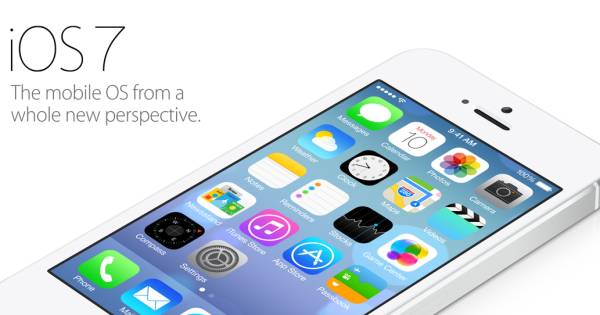
Today, Apple announced the much anticipated iOS7. One of the main concerns for iOS is that the OS itself hasn’t really changed since it was first released. iOS has looked virtually the same throughout the years with very little change aside from new apps being added and new features. Well, iOS7 changed all that with a completely new look that looks to give iOS a bit more maturity. Gone are the textured apps and shine. iOS7 is now cleaner and more refined looking.
I’m not really going to talk much about iOS7 here as you can see and read about it all at Apple.com right now including a full video of how it looks running. Instead, I’m going to just talk about a few new features that caught my eye, especially those features I’ve been most looking forward too.

Control Center – This is a feature that we’ve been asking Apple for for years now. Yes, it’s been available for the Jailbreak community but never for those who didn’t want to mess with their devices. The Control Center allows you to quickly access those most used settings such as turning your WiFi on and off, the Bluetooth, and even airplane mode in with a quick swipe and a tap. It even allows you to control your music, the volume, and allows you to quickly access your flashlight, timer, calculator, and camera. As you know, I’ve been playing with an Galaxy S4 lately and this is definitely a feature I wanted to have on iOS and my iPhone.

Multitasking – Multitasking on iOS wasn’t bad, but it wasn’t great either. It basically just showed you a row of icons of apps you had open and nothing more. Well, multitasking sees a huge upgrade and now shows you a snapshot of what the app is actually doing that is open. Apps show up as cards now with the app icon below them. Quckly swipe left or right to view all apps running. You can even now swipe up on an app to quickly close it instead of the old method of holding it down and then tapping the X. This is very similar to how WebOS did multitasking and was by far one of its neatest features. I’m glad to see Apple incorporating some of those ideas here.

Camera and Photos App – Apple also saw fit to update the Camera app which on previous versions of iOS, was pretty basic when compared to what Android or BlackBerry 10 had. The new Camera app now makes it easier to select different capture modes by swiping through them and now adds a new square picture mode. There is even a brand new filter mode that allows you to apply popular photo filters to your images in either real time or after a photo has been shot. There will be initially 9 filters to choose from.

With the Photos app, Apple too has beefed this up with way more organizational emphasis. Photos are now arranged as Collections, Moments, and Years. Your photos will be smartly grouped based on your location and the time taken. It somehow knows how to group them. It’s a neat feature and a welcome addition over the way organizing photos is done now.
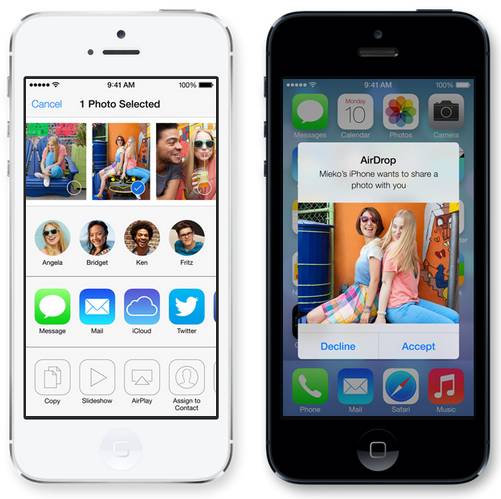
AirDrop – AirDrop is a brand new feature making its appearance on iOS7. AirDrop allows you to quickly share photos, videos, documents, or anything really with a quick tap of a button. AirDrop lets you share with contacts nearby as well as people who may not be in your contacts list. All this is done via WiFi and Bluetooth. This would be very similar to Samsung’s S-Beam feature except no “bumping” is required. You can share from across a room if need be.
Final Thoughts
Overall, a very good showing from Apple with the new iOS7 update. I covered a handful of the many new features iOS7 has in store for us including updates to Siri, Notification Center, Safari, and the new security features for deterring thieves. There really is a ton that is new with iOS7 and you can find much more detailed information about them here at Apple’s official iOS7 page.
[via Apple]
 The Gamer With Kids
[…] Apple Announces iOS7 – “Biggest Change to iOS Since the Introduction of the iPhone”… […]