

As a parent, I want the latest learning devices for my children, though I don’t want to pay over a certain price point because I know how kids can treat their stuff. Kids can be pretty rough with their toys and other gadgets and you really don’t want to spend $400 for a tablet that they might drop, bang into walls, or otherwise get all scratched up and dented from rough usage. As big of an iPad fan I may be, I would never really buy a new one for my kids mainly because of how much they cost and the thought of breaking and expensive device. That’s why I’m all for cheap tablets regardless of the fact that they may run Android. There are a whole slew of affordably priced Android tablets out now that can be well suited as a child’s first tablet. Many of these are in the 7-inch variety which in my opinion, can be the perfect size for the pint sized humans. One of these new 7-inch tablets comes from Samsung in the form of their updated Galaxy Tab line, the Samsung Galaxy Tab 3 7.0-Inch. This is their latest 7-inch model that is priced at a very respectable, $199, though it faces stiff competition from the likes of Google’s Nexus 7 and even Amazon’s Kindle Fire.
Design and Build
If you’re a fan of the Galaxy S4 smartphone, you’ll be a fan of the Galaxy Tab 3.0. It literally looks like a giant 7-inch smartphone, minus the phone. Even the box it comes in is similar to that of the Galaxy S4. The one Samsung sent to me was in their classic white color with silver border trim. As a disclaimer, I will not be comparing this device with any other popular Android tablets only because I have not had any hands on time with those devices to make an accurate comparison.
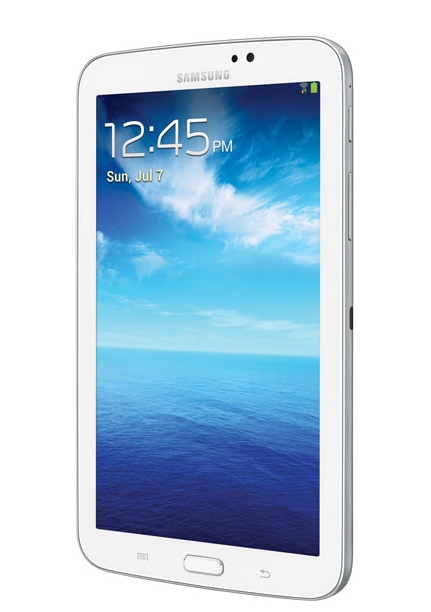 I’ll start this off again by saying that if you’re looking for iPad-like build quality and materials, you’re not going to find it here. Like most Samsung products, the Galaxy Tab 3 is made of polyarbonate plastic. It’s a tough material that is supposed to withstand every day abuse, but it doesn’t have that high end feel like aluminum does. Of course you’re paying a much lower price for this tablet so there are some tradeoffs and I think for the price and what it’s for, it’s okay that it’s made of plastic. I wouldn’t really expect it to be much more than that with the price it’s at.
Upon first inspecting the new Galaxy Tab 3 7.0-inch, the first thing you may notice about it is that unlike the Galaxy S4, you can not remove the rear plastic back on it. That means it does not have a removable and replaceable battery. This isn’t entirely surprising considering that their Galaxy Note tablets don’t have this feature either. What this also means is that Samsung makes the SD card slot much easier to get to by moving it to the outside and hiding it behind a little door. More on this later. Another slight difference in appearance is that the volume rocker and power button are now both on the same side (upper right) with the IR blaster also being moved to the middle right of the Galaxy Tab 3. There is one huge improvement however over the Galaxy S4 design and that is that the speakers are on the bottom of the tablet instead of the underside of it. This makes audio much easier to hear and what I would call one of the major design flaws of the Galaxy S4.
The Galaxy Tab 3 also doesn’t quite have as many features as the Galaxy S4 does. For instance, up from on its face, you’ll see that it only has a 1.3MP camera for video chatting. It doesn’t have all the other fancy sensors that the S4 has so no air gestures or air view or smart stay for instance. Also the bottom touch buttons don’t light up like the S4 ones do. The screen however is very bright and crisp and though the 1024×600 pixel display isn’t as good as the Galaxy S4 display or some of the newer 7-inch tablets, it’s still pretty decent for its price point.
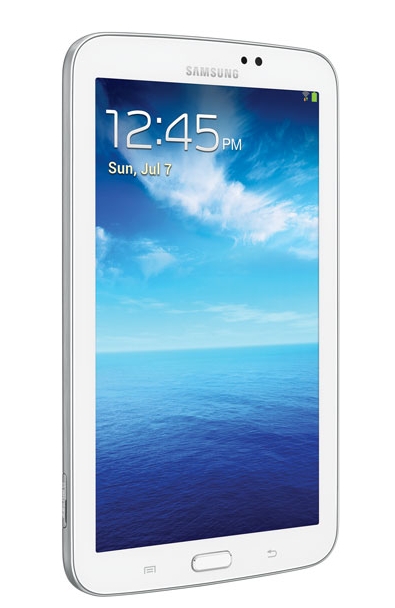 There is a thin metal band that surrounds the outer edge of the Galaxy Tab 3. On the right side of the band you’ll find the power button, volume rocker, and IR blaster. On the left side of the band you’ll find the memory card port which is hidden behind a little plastic door. On the bottom of the band is where the USB sync/charging port is located along with the two speakers and mic.
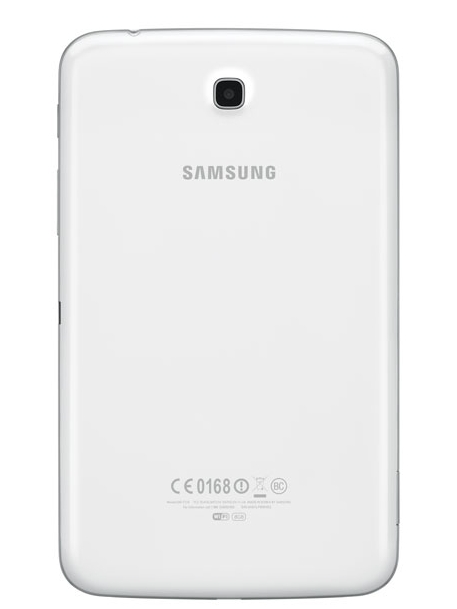
The rear of the Galaxy Tab 3 like I stated before is made of polycarbonate plastic. Unlike the Galaxy S4, the rear panel, it doesn’t have that diamond looking weave on it and is instead a solid white color. I forgot to mention that the front bezel is like this too and is also solid white. On the back, you’ll also find the rear camera which is a 3.0MP unit which is a bit low considering the iPad Mini has a 5.0MP unit. It also lacks an LED flash, but that’s not surprising for a tablet as most don’t have one either.
For the most part, the specs are to be expected based on the price. I wasn’t expecting iPad Mini like looks or features based on the lower price point but for the most part, it’s on par with other Android based 7-inch tablets in its class. It seems pretty well made, despite the use of plastic and I appreciate the fact that it has expandable memory in the form of a memory card slot and has a pretty nice looking, bright screen, and it’s lightweight.
Software
What comes loaded on the new Samsung Galaxy 3 7.0-Inch is Android 4.1.2 Jellybean, which is not the latest and greatest. In fact, it’s not even as updated as what comes on the Galaxy S4, which is 4.2.2. Though I have read that there is an update you can apply to it, I have yet to do it on this unit. For now, I’m just reviewing it as is.
 Since this is the Wi-Fi edition and not a carrier edition, you’ll be happy to know that this Tab 3 7.0-inch does not include all the bloatware that gets installed on to it from carriers. Instead, you get a relatively clean version of Android with a long of Samsung software upgrades and features. It’s not stock Android, but it’s not bad. The Galaxy Tab 3 has Samsung’s Touchwiz installed which is their skin. If you’ve used any of the Galaxy S smartphones, the Galaxy Tab will be a breeze to use as it’s basically the same despite the slightly older version of Android.
Along with Touchwiz, Samsung also includes a few of their own apps such as ChatON (a multi-platform chat app), Memo (which is like S-Memo on the Galaxy S4), S-Voice (like Siri), WatchON, and also their own Samsung App Store. Other than that, it’s free from the type of bloatware you see on carrier branded versions. My favorite of the apps is probably WatchON as it allows you to use your IR blaster to control your television and cable/satellite box. It even has a handy guide feature so you can see what is currently playing and what will be coming up. It’s a neat feature for TV addicts.
Aside from that, you’ll probably want to hit any of the app stores, whether it be Samsungs, the official Google Play store, or even Amazon’s App Store and start downloading all your favorite apps. Note however that Android tablet apps are still not as plentiful as they are on iOS so many apps you download may end up looking like just stretched smartphone apps.
Usage
The 7-inch version of the Galaxy Tab 3 is very easy to hold. It basically just feels like a very big smartphone and less really like a small tablet. It’s not quite as tall as an iPad Mini and it’s also a lot skinnier too. It is also very thin and quite light which is a big plus when it comes to tablets. Again, if you’ve used a Galaxy S4 or even a Galaxy Note, it basically just feel like a slightly larger version of these.
 If you’re currently using a Galaxy S4, you may be disappointed to hear that the Galaxy Tab 3 7.0-inch is a bit less powerful. It only has a 1.2GHz Dual Core, which means that it’s not quite as peppy when using it. I mean for the most part, the tablet works well, but sometimes you will notice some lag when switching between apps or when trying to play graphic intensive games.
Of course being a 7-inch tablet, it works great as an ebook reader. There are plenty of apps you can download to read ebooks and on a 7-inch screen, it’s like holding a paperback novel. The Galaxy Tab 3 7.0-inch also works great for movies thanks to its widescreen format and the placement of the speakers makes the audio that much easier to hear when in comparison to the Galaxy S4.
Other than that, a tablet is only as good as you make of it. Each person has their own reasons for a tablet, whether it be for reading, browsing the web, checking emails, or playing games. It all depends on what you want it for. The Galaxy Tab 3 7.0-inch can be any of those and more and all in a compact package that is easy to carry around and hold.
In the Hands of Children
Now, the big question, is this a good tablet for children? Here’s the thing, if you are going to be giving the Galaxy Tab 3 to a child, then all the above I mentioned really doesn’t mean all that much. Kids don’t really care about specs or features, especially when they are in grades Pre-K to grade 5. Parent’s shouldn’t really care either. The main thing is that you want a tablet that will be able to survive and do what it needs to do, and at a very good price.
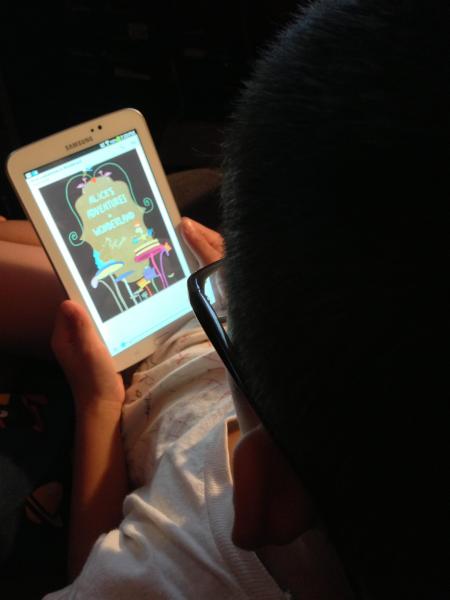 With that said, the Galaxy Tab 3 7.0-inch is a tough little tablet. Where as something like the iPad in the hands of a child, you really want to be watching them like a hawk because we all know how fragile they can be. In fact, around kids, you want iPads in nothing less that military grade body armor to protect them from drops. With the Galaxy Tab 3, this isn’t the case. I actually feel like it can withstand drops better and even if it does get a few scratches here and there, I don’t mind as much since I didn’t pay a whole lot for it. Also, at its smaller size, it’s also much easier for them to hold in their tiny hands, while still feeling large to them. The plastic back on it is also much easier to grip than aluminum which most iPhone and iPad users should know, can be be very slippery.
As for software for children to use, you will need to think about creating an Google account for them first as you probably don’t want them accessing your Google account with access to your emails and other things. Note however that Google restricts certain features based on age. For instance, I could not set up a Gmail account for my son based on his age so I had to fake his age to something older. This is not a limitation of the Galaxy Tab 3, but instead is a limitation with Google.
Once you have this all set up, you’ll be good to go. They’ll be able to access their email account, calendar, and Google Play. I would however restrict access to Google Play by going into content filtering and only allowing apps rated for their age. I would also check off the section that activates passwords in order to restrict purchases as well. Once you have this part set up, you can go ahead and start downloading anything from apps to books. I won’t get too much into the apps, but there are a ton of educational apps for children in Google Play. They can learn anything from their ABC’s to 123’s. You just have to find ones that they like and will keep them interested.
 If you want them to do more reading, Google also has an excellent bookstore with Google Play Books. Here you can find books categorized by age range. There’s even an education section here as well a section for textbooks, although the textbooks I believe are for high learning classes.
Now, if you don’t like Google Play Books, you don’t have to use it as you can also install Amazon’s Kindle app through Google Play and pick up lots of educational children’s books through there if you’re more comfortable using Amazon. This also goes for the Nook app, Kobo app, and whatever other ebook reading app that is available. And like I stated above, the Galaxy Tab 3 7.0-inch is the perfect size for reading because it is basically the size of a paperback book. Since it’s digital, you can adjust things like font size and color in order to make reading easier for children.
Of course the Galaxy Tab 3 is also perfect for recreational use like for gaming or watching videos. It makes for a perfect device for watching Netflix on the go or any other video streaming service. Kids can also use it as a neat way to take photos and video as well as use it to communicate with family members via messaging apps and video messaging apps.
Final Thoughts
While there are not more powerful 7-inch tablets out on the market now an many alternatives, the Galaxy Tab 3 7.0-inch is good for the price. The screen is bright and responsive, the device itself is well made and seems pretty tough, and the fact that it has expandable memory through use of a memory card slot is a huge plus in my opinion. I also like the fact that it has dual cameras and an IR blaster which helps add some value to the entire package.
And while it may not be as powerful as many of the tablets out now in its class, it’s still very usable for children where having the highest specs possible isn’t really a concern to them. All they will care about is that they can read on it, watch movies, play games, use apps, and occasionally send messages. All of these things it will do quite well for them.
Shop Links


Please Support TheGamerWithKids
I love to bring you guys the latest and greatest reviews whether it be apps or gadgets. However, I can’t keep doing that unless we have your continued support. If you would like to purchase any of the items mentioned on the site, please do so by clicking our links to Amazon first and then purchasing the items. This way, we get a small portion of the sale and this helps me run the website.
 The Gamer With Kids