

Let’s get this out of the way. I’m an avid iOS user. I use both an iPhone and an iPad as my main devices and never saw the need to use or try anything else. Over the past year, I finally branched off into the world of Android thanks to the many devices Samsung has allowed me to try out. I’ve been able to open my eyes to other platforms and can honestly say that there are some things impressive about Android that I wish iOS had, but in the end, nothing has really swayed me to becoming an Android only user or for that matter, an Android biased user. As great as the Samsung Galaxy S4 was for its speed and excellent display, I just never fully made that switch. It could also have been that I just couldn’t handle using such a big phone at the time and never really gave it my full attention. Now, if I thought the Galaxy S4 was too big, I would think that Samsung’s latest and greatest, the Galaxy Note 3 would be way too huge too, right? You’d think correct, but in this case, being huge just might be the way to go for a device like this.
Hardware
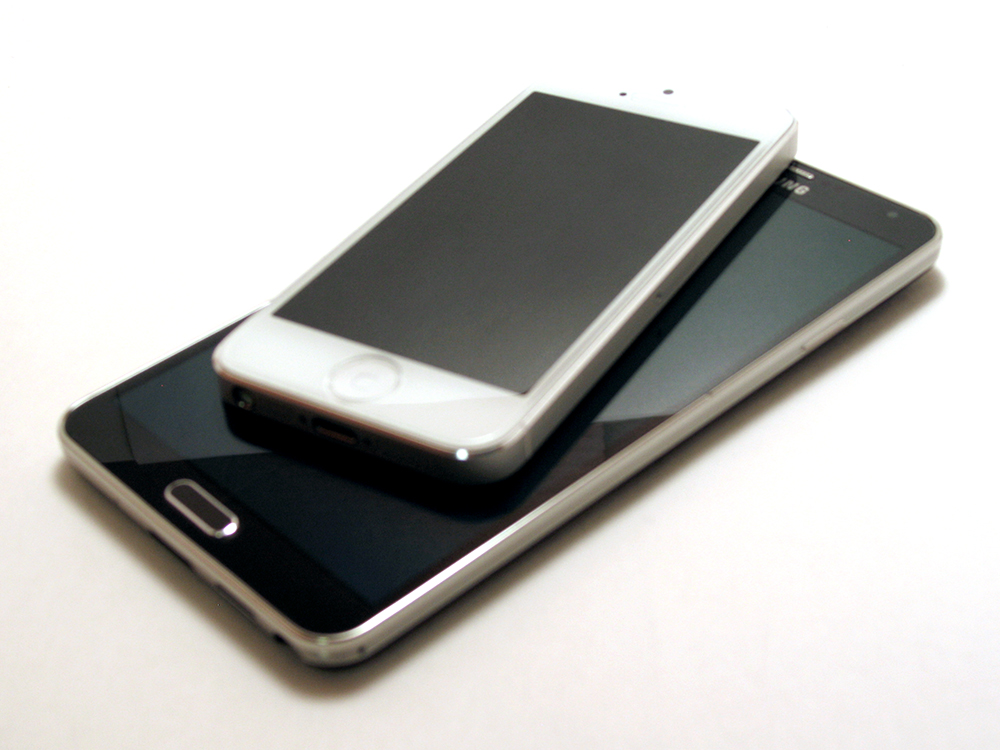 The only other smartphone from Samsung that I’ve previously looked at was the Galaxy S4. At the time of review it, it was considered the best smartphone Samsung made. It was fast, had an awesome screen, and excellent battery life. The only few problems with it in my opinion is how cheap it kind of felt with its plastic back and the weird rear location of the speaker. There really wasn’t anything much about it that got me to permanently switch to it from my current iPhone. However, the same can’t be said about the Galaxy Note 3. In fact, I want to say that the Note 3 hardware is much more impressive than the Galaxy S4, and I’m not talking about how much larger it is.
Just to get it out of the way, the Galaxy Note 3 is pretty much all plastic again, though it doesn’t look it. It does a better job of looking more upscale and luxurious than any other Samsung Galaxy smartphone before it. First of all, the Note 3 features a gorgeous 5.7-inch, full HD super AMOLED screen with a 1920 x 1080 resolution. That’s a resolution that is equal to that of my 21-inch computer monitor! Needless to say, it’s a sight to see and I want to say that’s it looks even better than the retina display on my iPhone 5. The screen just seems to be brighter, though I’m sure it might just be because it’s a larger size so it looks more impressive. The bevel on the screen also looks better and has a brushed aluminum type look to it. Of course this is on the black unit and I have no idea what the white one looks like. Up top there is a 2MP camera as well as various sensors and an LED status light.
Surrounding the border of the Note 3 is what appears to be a chrome metal border, but it’s just chromed plastic. It looks pretty good though and has a neat lined texture to it that adds some nice detailing. The phone is laid out similar to how the Galaxy S4 was laid out. The power button is on the right side of the border while the volume rocker is on the left. The top houses an IR blaster as well as the audio jack and a mic. On the bottom, you’ll find another mic, the speaker (which is much better placed than the Galaxy S4), a USB 3 compatible charging port, and cavity where the S Pen is stored. Let me go back to the USB charging port. It looks a little bit different that your typical micro USB port and has an extra space in it. This is to accommodate the USB 3 charging/sync cable. Of course you can also use a regular micro USB cable if you aren’t using USB 3 to sync data.
 What really makes the Note 3 look upscale though is the rear battery cover. When I first saw this, I thought it had a leather back. In fact, all the way until I actually removed the back cover did I notice that it was actually made of plastic. It looks like leather, feels a bit like leather or at least “pleather” and even has what appears to be stitching around the border of it. It isn’t until you look really closely do you start to notice that it isn’t. Removing the cover confirms your suspicions and you discover just how thin and flexible the back cover really is. Although when it’s on the phone, it doesn’t feel like that at all. Underneath the cover you’ll find a rather large battery, the sim card slot, and the micro SD slot right above that. The rear also houses a 13MP auto focus camera with built in LED flash.
Overall, the Note 3 hardware does not disappoint. It’s much better than the Galaxy S4 I had before and definitely looks much more upscale and luxurious. It’s still a really large phone and there’s nothing that can change that, but thanks to the S Pen, there is a reason for how large it is. I’ll explain this a bit later.
Software
The Galaxy Note 3 is preloaded with Android 4.3, which was the latest version. Because of this, it was also the only device in Samsung’s collection that could work in conjunction with the Galaxy Gear smartwatch. I won’t go into detail really about Android 4.3 as that’s not really what makes the Galaxy Note 3 so special. What makes the Note 3 a Note are all the custom apps that Samsung has preinstalled, mainly all Samsung developed apps that make use of the S Pen stylus. The S Pen and all the S Pen optimized apps are literally the stars of the show here and are what make the Note 3 such a capable and interesting device.
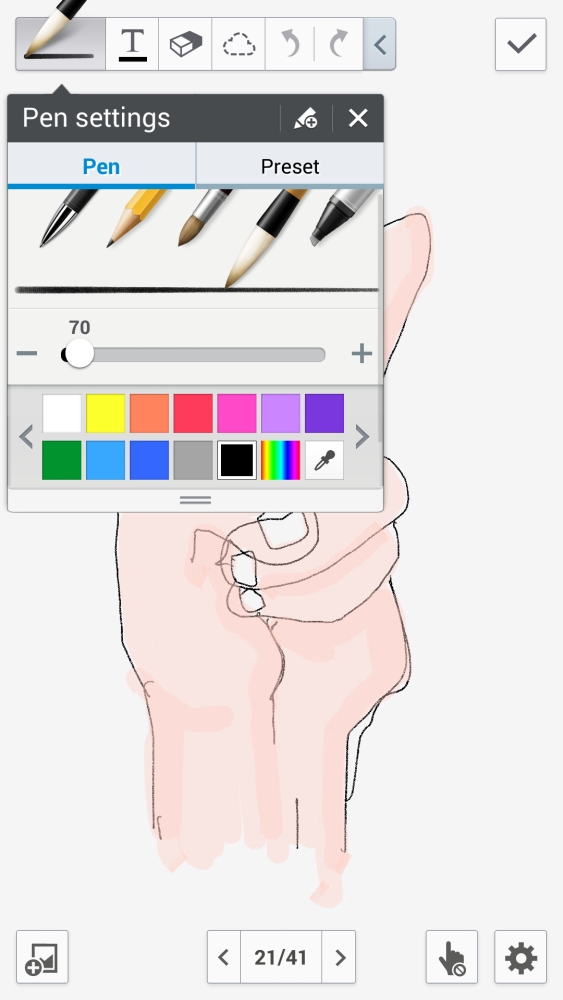 The use of the S Pen sets the Note 3 apart from all over Samsung Galaxy devices as well as pretty much any other smartphone out there. You see, the S Pen allows for pressure sensitive strokes thanks to technology from Wacom. Now other devices can really boast that type of functionality out of the box and it makes the Note 3 infinitely more useful and productive. Two of the most useful software additions is that of the enhanced S Note app and Air Command.
S Note is a full featured note taking application. It allows for both regular text notes as well as hand drawn doodles and notes. That means that it can very much function like an old school notepad that you might have carried with you once in the past. I find that much easier entering a note via onscreen keyboard and I’m not limited to just text either. What’s great is that because the S Pen is pressure sensitive, stokes you make on the Note 3 looks very natural, just like using a real pen and paper. The S Note app allows you to make different notebooks, each with a different theme or topic so your notes can all stay organized.
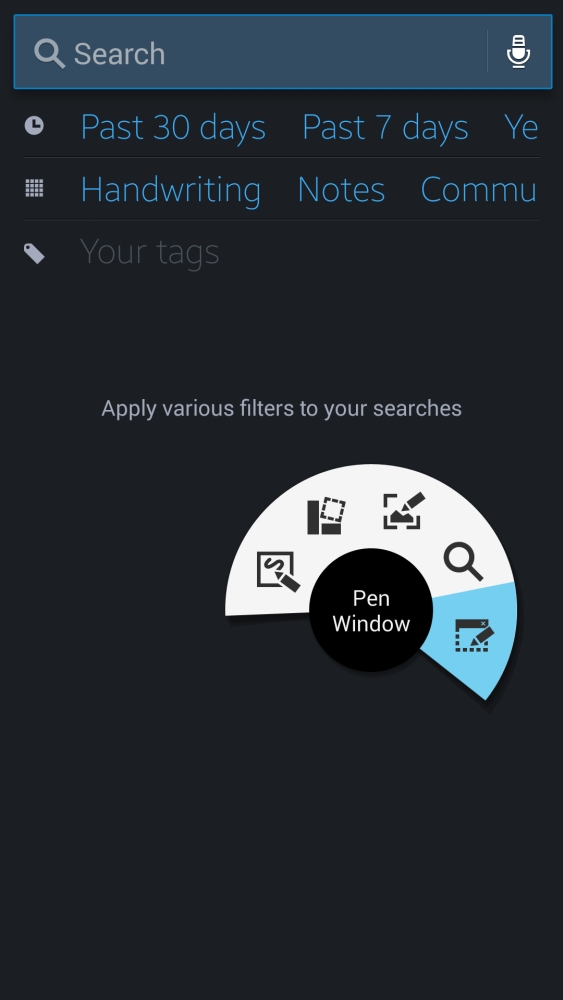 The second piece of software that I found to be very useful is Air Command. Basically Air Command is this little menu that pops up whenever you remove the stylus from storage or if you click the little button on the S Pen right above the screen. This menu allows you to to do 1 of 5 different tasks, create an Action Memo, add an item to the Scrapbook, write a note directly on whatever screen you are on, use S Finder, and create a Pen Window. They are all pretty useful except for the S Finder option, seeing as you can already get to S Finder by long pressing the menu button on the Note 3. I would have much rather them replace this with a more S Pen related item. Air Command works well though and I really like the fact that you can have it activate automatically every time you remove the S Pen from its carrier.
The Action Memo app is probably one of the more useful apps of the bunch. It lets you jot down quick notes on what looks like a Post-It note. However, with an Action Memo note, you’re able to link certain actions to the text you jot down. For instance, you can write a phone number down and then link it to an action, in this case, to place a phone call. You can do this for phone numbers, email addresses, contacts, twitter contacts, and more. This allows you to jot down items and use them without having to retype them over again.
Of course if you’re looking to make annotations on something you see on your screen, like a webpage or a photo, using the Screen Write option is the way to go. What this does is it creates a screenshot the current screen and allows you write on it. You use all the same writing tools as you find in S Note however these type of notes are stored in your image gallery and not in S Note.


The Galaxy Note 3 also includes a whole host of other Samsung created custom apps, many of which you also find on their other devices like the Galaxy S4. This includes S Voice, Group Play, S Translator, Smart Scroll, Smart Pause, Air Gestures, Air View, Screen Mirroring, and Samsung KNOX just to name a few. Most of this however just amounts to features that you probably will never use much on a daily basis, though Air Gestures come in handy sometimes and S Voice is very SIRI like. Your miles may vary with these built in Samsung features, but at least Samsung is trying to differentiate itself from other Android makers by adding value to their software.


One neat feature that I need to mention before I forget is that of One-handed operation. It’s an option available to users that can be turned on in the settings menu and allows for one-handed usage. You might ask yourself how is this possible? What this setting does is it shrinks the screen down to a more manageable size and moves it over to either the left or right screen edge. This allows you basically use the device and the screen one-handed. It shrinks it down to roughly around the same size as an iPhone screen and really does make he device simpler to use one-handed. If you don’t want the whole screen to shrink, you can even just make the keyboard shrink to a smaller size and justified left or right for easier one-handed usage. It’s a pretty neat feature that adds more accessibility for such a large device.
Still though, the stars of the Galaxy Note 3 show are in the S Pen specific apps that make great use of this excellent stylus.
Final Thoughts
At the beginning of my review, I stated how much I dislike large phones because they are generally difficult to use. However, as huge as the Galaxy Note 3 is, I actually found it quite manageable and think the sizing of it is perfect for the type of device it is. A person who would buy a Note 3 would be the type of person who wants to use a stylus based device and therefore, would not really care about using the Note 3 with one hand. The larger screen allows for much more area to be able to write with the stylus and is honestly much easier to jot down some notes than it is trying to type them out. This is one instance where I actually find that the larger screen is better than a smaller screen.

Although the phone is quite large, I can still carry it around in my back pocket and it’s light enough where it doesn’t feel like you have a tablet stuffed into your pants. I just love how it adds an extra useful function over other smartphones, mainly because of the S Pen. Not only does it do everything every other Android smartphone can do and more, it also functions as my sketchpad in which I can easily sketch a doodle or idea that comes to mind quickly and easily. I don’t have to dig for a stylus in bag to sketch something up on my iPad or a pencil to sketch on a piece of paper. I can do it all on the Galaxy Note 3 and not only that, it makes sharing it all just as easy.
Overall, the Samsung Galaxy Note 3 is the only reason I’d ever fully switch to Android. I had my reservations about it before and made fun of it’s gargantuan proportions, but now I see that there’s a reason for it and it all makes perfect sense. Don’t think of it as a large phone, think of it as a digital Moleskine notepad that also happens to function as a smartphone for everything else.
We’ll have more on the Galaxy Note 3 soon to discuss some of its individual apps and functions.
Please Support TheGamerWithKids
I love to bring you guys the latest and greatest reviews whether it be apps or gadgets. However, I can’t keep doing that unless we have your continued support. If you would like to purchase any of the items mentioned on the site, please do so by clicking our links to Amazon first and then purchasing the items. This way, we get a small portion of the sale and this helps me run the website.
 The Gamer With Kids
[…] a good long while, the Samsung Galaxy Note 3 was my go to device when it came to reviewing Android games and apps. It was a good device that was […]