
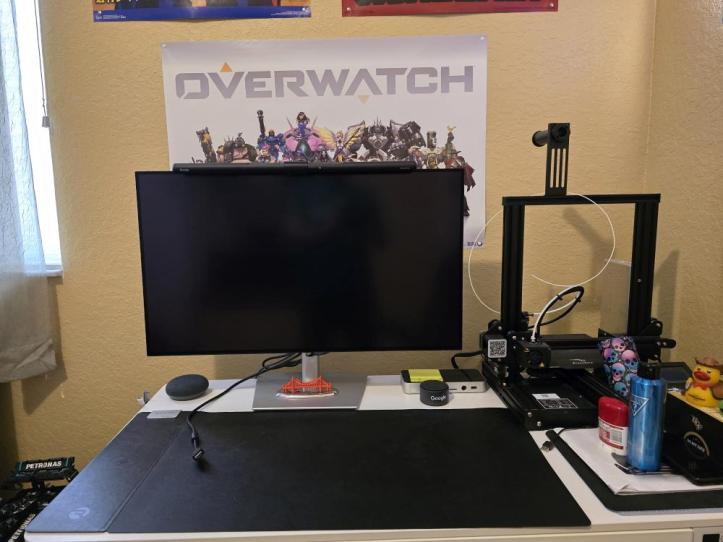
You may not know this, but Dell produces some excellent productivity monitors. I’ve used Dell monitors in the past and they’ve always been pretty reliable. However, as a gamer, performance wasn’t always up to par, especially when it comes to refresh rate. Take, for example, the Dell UltraSharp 38 Curved USB-C Hub Monitor (U3824DW). I reviewed this a couple of years ago and was thoroughly impressed with WQHD+ resolution, the color output, and the brightness. However, it only had a 60Hz refresh rate, which might be great for everyday tasks, but not so much for gaming. Anyways, Dell has finally introduced a monitor that fixes this in the Dell UltraSharp 32 4K Thunderbolt Hub Monitor (U3225QE). While not as large and isn’t curved, it makes up for that with an IPS display with a higher resolution and refresh rate along with additional other goodies that make it unique.

DESIGN
Current Dell monitors all share a similar design language. The Dell UltraSharp 32 4K Thunderbolt Hub Monitor is no different. It’s aesthetically pleasing to look at, with its mostly silver metallic body and thin black bezel face. It’s very clean and modern-looking, and looks great in a work environment and home office setup. I should point out that the display has a matte coating on it, which I love because it helps eliminate glare and reflections.
Aside from its appearance, the functionality and adjustability are present. Not only can you adjust the height of the monitor, but you can also adjust the tilt angle and swivel angle. Although my favorite inclusion is the built-in USB-C hub.The hub is built into the back of the monitor and includes a ton of additional ports. Below is a quick rundown of what’s included:
- 1x HDMI 2.1
- 1x DisplayPort 1.4 (In)
- 1x DisplayPOrt 1.4 (Out)
- 1x Thunderbolt 4 (Downstream)
- 1x Thunderbolt 4 (140W)
- USB 10Gbps Type-C (Upstream)
- 4x USB Type-A (Downstream)
- Audio Line Out
- RJ45 Ethernet Port
- 2x USB Type-C (Downstream with 15W Power Charging)
- 1x USB Type-A (Downstream with BC1.2 + Power Charging)
I should point out that the display has a neat feature on the front side where a pop-out quick access panel can be accessed which includes 2two of those USB-C ports and one USB Type-A port. This gives quick access to charging or attachment of accessories when needed.

EXPERIENCE
Setting this monitor up was pretty straightforward. The stand is solid and allows you to adjust the height, tilt, and even swivel the screen. This is great for finding that perfect viewing position, whether you’re leaning back for a gaming session or sitting up straight to get some work done. The picture quality is also really good right out of the box, but you can easily tweak the settings if you want to fine-tune things.
Speaking of which, let’s talk about that picture. This is a 32-inch screen with 4K resolution. What does that mean for you and me? It means everything looks incredibly sharp and detailed. Games are stunning, with all those little textures and details popping. Movies are a joy to watch. Even just browsing the web feels better because the text is so clear. Let’s also not forget that it’s packing a 120Hz refresh rate now, which means everything on screen moves as smoothly as butter.
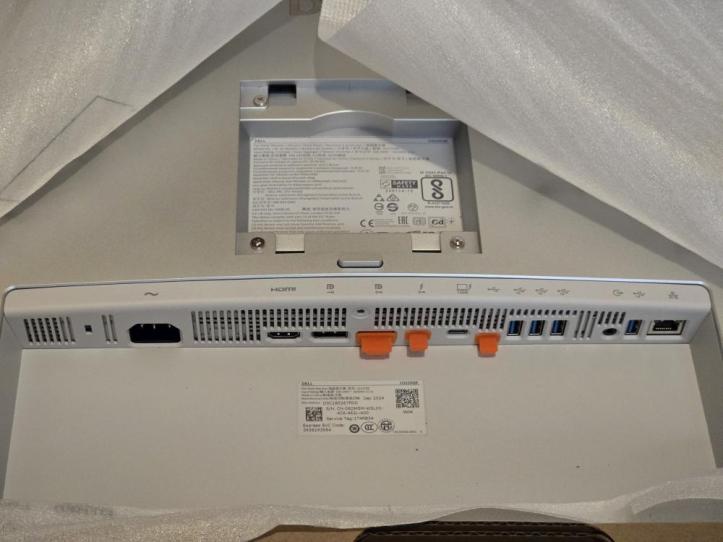
Next, let’s talk about this built-in hub because it’s a game changer if you’ve never had a monitor with one of these before. Just like its curved cousin, this monitor lets you connect your laptop with a single Thunderbolt cable. That one cable does it all: it charges your laptop, sends a video signal to the display, and provides access to all the USB ports on the back of the monitor. What that means for you is no more desk clutter. Plug in your keyboard, mouse, and even an external hard drive into the monitor, and they all connect to your laptop through that single cable.
Even if you don’t have a Thunderbolt laptop, that’s okay because the Dell UltraSharp 32 4K Thunderbolt Hub Monitor has regular USB ports, one HDMI port, and two DisplayPorts. You can easily connect your gaming consoles, home computer, or whatever else you need. It’s like a central command center for all your devices.
Like any good piece of tech, there are a couple of things to keep in mind. While the refresh rate is perfectly fine for most gaming and everyday use, super hardcore gamers who play fast-paced competitive games might look for something with an even higher refresh rate. There’s also no built-in speakers, and a high-resolution, feature-packed monitor like this does come with a premium price tag. It’s an investment, but if you value a sharp display and the convenience of the Thunderbolt hub, it’s definitely worth considering.

FINAL THOUGHTS
The Dell UltraSharp 32 4K Thunderbolt Hub Monitor (U3225QE) is a fantastic all-around monitor that really shines for those who want to mix business with pleasure. The stunning 4K resolution makes everything look incredible, and the Thunderbolt hub functionality is a lifesaver for keeping your desk clean and making connections easy. With plenty of other ports, it’s versatile enough for all your devices. While it might be a bit of an investment, the convenience and picture quality make it a winner in my book. If you’re looking for a top-notch monitor that can handle work, play, and everything in between, this Dell UltraSharp is definitely one to consider!
Thank You for Visiting TheGamerWithKids
I love bringing you guys the latest and greatest reviews whether it be apps or gadgets, but hosting and maintaining a website doesn’t come cheap. If you would like to purchase any of the items mentioned on the site, please do so by clicking our links to Amazon first and then purchasing the items. This way, we get a small portion of the sale and this helps me run the website. Thanks!
This review is made possible by my affiliation with G Style Magazine. These items were sent to us by the company or its PR reps for review and evaluation. It is also featured on the G Style Magazine website which is a tech blog that focuses on the fashion aspect of tech. Please visit their site for more interesting reviews on all your favorite gadgets and gear.
 The Gamer With Kids