

When I’m on the go and working on my laptop, one screen just isn’t enough. I’m used to working on multiple displays, and being confined to just one kills my productivity. That’s why sometimes you have to pull out that portable display for extra real estate. But what if you had three portable displays in one? The Aura Triple Aero 15.6″ Pro Max aims to answer question by offering a unique, portable triple-screen setup, providing an immersive 43 inches of horizontal screen real estate in a surprisingly compact form factor.
DESIGN
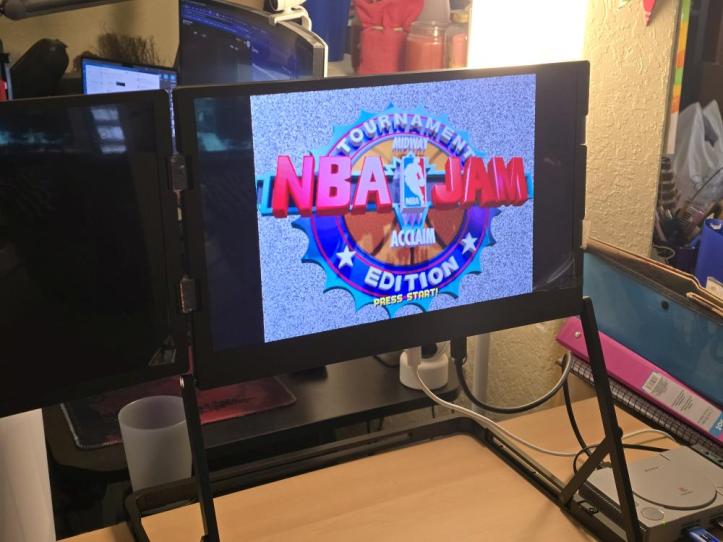
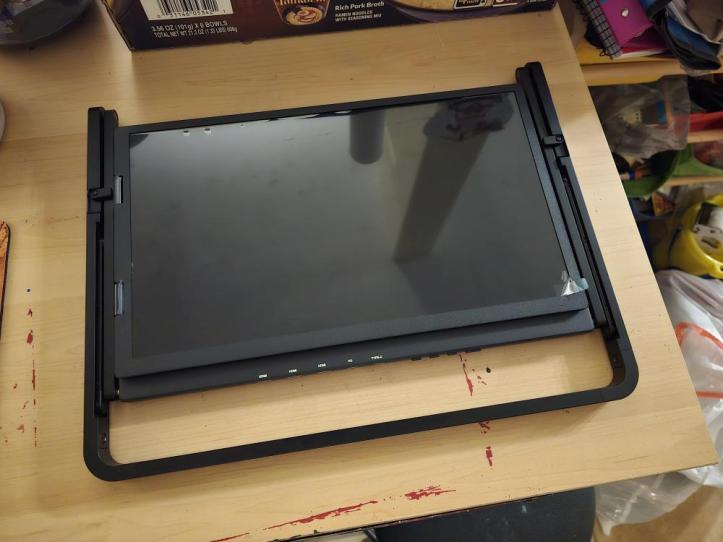
The design of the Aura Triple Aero 15.6″ Pro Max is its most defining feature. Crafted with a premium full-aluminum chassis in a “Spatial Grey” finish, it feels incredibly high-end and complements most modern laptops, particularly premium models like MacBooks. The folding mechanism is ingenious, allowing the three 15.6-inch displays to collapse neatly into a briefcase-like shape, making it surprisingly portable for what it offers. When folded, it measures 16.5 inches (420 mm) in width, 14.1 inches (360 mm) in height, and 1.1 inches (30 mm) in thickness, fitting comfortably into a standard laptop bag.
While the folding design is largely well-thought-out, there’s one minor quibble: one of the screens remains exposed when folded outward, which could be a concern for screen protection during transport. An inward-folding design for all screens would have been ideal. Despite this, the integrated kickstand is a welcome addition, offering three height adjustments (3.9 in, 8.2 in, 9.8 in) to align perfectly with various laptop sizes. At 7.05 lbs (3.2 kg), it’s a substantial accessory, but the robust build quality justifies the weight, speaking to its premium construction.
SPECS
The Aura Triple Aero 15.6″ Pro Max boasts impressive specifications for a portable monitor system:
- Displays: Three 15.6-inch LED matte Full-HD (1080p) HDR screens.
- Brightness: 350 cd/m²
- Contrast Ratio: 1200:1
- Refresh Rate: 60 Hz
- Aspect Ratio: 16:9
- Color Support: 16.7 million colors (100% sRGB)
- Viewing Angle: 178° IPS panels for consistent color reproduction.
- Connectivity: 2x USB-C ports (supporting power delivery and display signals), 3x mini-HDMI inputs.
- Power: 65W power adapter included, capable of reverse-charging devices up to 60W.
- Audio: Integrated 2x 6Ω 2W speakers.
- Compatibility: Works seamlessly with macOS (including M1/M2/M3/M4 chips and Intel processors) and Windows laptops (11″ to 18″).
- Dimensions (Folded): 16.5 in
 × 14.1 in (H) × 1.1 in (T)
 - Weight: 7.05 lbs (3.2 kg)
While the Full HD resolution is perfectly adequate for productivity tasks, users accustomed to 2K or 4K displays might notice the difference, especially for highly detailed creative work. The 60Hz refresh rate, while standard, isn’t ideal for competitive gaming.
EXPERIENCE
Setting up the Aura Triple Aero is straightforward, primarily requiring a single USB-C connection for compatible laptops that support both power and display signals. For other devices or multiple inputs, the mini-HDMI ports offer flexibility. Driver installation is necessary for all three displays to work properly.
The most immediate and impactful aspect of the user experience is the sheer amount of screen real estate. Having three 15.6-inch displays greatly enhances multitasking capabilities. For business users, working on spreadsheets, documents, and presentations becomes significantly more efficient, eliminating the constant need to switch between windows. Creative professionals will appreciate the ability to spread out their timelines, tool palettes, and preview windows across the expansive display.
The matte finish on the displays effectively reduces glare and reflections, which is crucial for extended use and in varying lighting conditions. The IPS panels offer wide viewing angles, however, we did notice some differences in color on each screen. Most might not notice it, but we did. While the 350 nits brightness is sufficient for most indoor environments, it might struggle in very bright conditions. The integrated speakers are functional but offer limited bass response and volume, so headphones or external speakers are recommended for media consumption.
Connectivity is stable when they’re working, with no reported signal dropouts. The option to reverse-charge devices up to 60W is a handy feature, consolidating power needs for your mobile workstation. While cable management can become cluttered with multiple connections, the overall benefits of a triple-screen setup far outweigh this minor inconvenience.
However, we encountered some hiccups with the hardware. For instance, while the drive installation was easy, the driver would not recognize the hardware half the time. It took numerous attempts of plugging and unplugging before the driver fully recognized the triple displays and allowed them to work. Also, when everything is folded up for travel, one of the displays is not protected, which is a bit concerning.
FINAL THOUGHTS
The Aura Triple Aero 15.6″ Pro Max is a game-changer for anyone who craves an expanded digital workspace on the go. Its premium aluminum build, innovative folding design, and generous screen real estate make it an invaluable tool for boosting productivity. While the Full HD resolution and 60Hz refresh rate might not satisfy all, it excels in its primary function: providing a highly functional and immersive multi-monitor environment wherever you are.
It’s also quite heavy for a portable accessory, however, it is a testament to its robust and solid construction. For remote workers, business travelers, and content creators who frequently move between locations but still require the efficiency of a multi-monitor setup, the Aura Triple Aero 15.6″ Pro Max is an excellent investment that truly redefines what a portable workstation can be. For everyone else, the Aura Triple Aero 15.6″ Pro Max is a bit overkill, and you may be better off with a simple, single display unit instead.
 The Gamer With Kids