

If you’re like me, you probably have too many devices and not enough ports. That’s the problem with many new laptops these days. I remember the days when plugging in a new mouse or external drive meant playing musical chairs with cables. But these days, there’s an easier way, and that with the use of a dock. That’s where the Plugable Thunderbolt 4 Dock (TBT-UDM) comes in. This is a 13-in-1 dock featuring a plethora of ports, along with 2x4K HDMI ports and 100W charging to handle all your accessories.
DESIGN
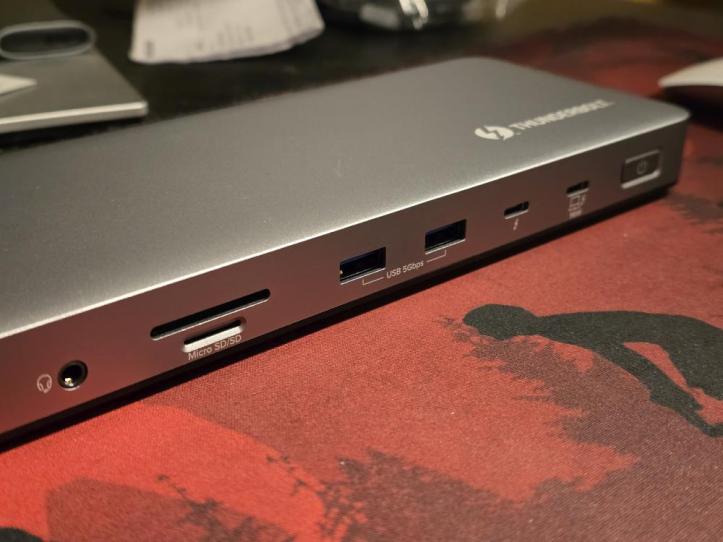
Right out of the box, the Plugable TBT-UDM feels like it means business. It’s got that sturdy, premium vibe, with a nice aluminum finish that makes it look right at home next to a MacBook. It’s not some clunky plastic box you’d want to hide, but something you’ll actually want to keep on your desk.
This dock is packed with ports galore, 13 of them to be exact. You get dual HDMI for two 4K screens (perfect for multitasking or editing photos), super-fast USB-C and USB-A ports for charging and file transfers, SD and microSD slots for camera folks, Ethernet for when Wi-Fi isn’t cutting it, and even a headphone jack. And with 100W charging, your MacBook stays powered all day without needing the power brick.

EXPERIENCE
Plug-and-play is really true here. If you’re on a newer MacBook with an M4 chip (or even earlier M-series), you just plug it in and you’re pretty much set. No drivers are needed; everything just works. That’s what you want in a device these days.
Of course the main reason to use a dock is to tidy up your desk. Instead of cables running everywhere, the Plugable dock made things instantly tidier. You can connect up to two monitors, extra accessories like a hard drive, a keyboard, a mouse, a webcam, and still have ports to spare. The dock handled everything smoothly, with no weird disconnects, and everything ran at full speed. Video editors, photographers, and anyone who works with big files will love being able to swap SD cards and external drives without juggling cables.
The only thing that would be considered a con is that the HDMI support tops out at 4K 60Hz. If you have a fancy 4K 120Hz monitor, this might not be the dock for you. However, this might be par for most Mac users who are used to using 4K 60Hz displays for work use. Also, if you’re using a base-level M1 or M2 MacBook, you can only use one external display, but again, that’s a MacBook thing, not a Plugable issue.
Aside from that, I just like the fact that I only need 1 cable to plug into my Macbook while all my other accessories stay neatly connected to the Plugable TBT-UDM.

FINAL THOUGHTS
If you’re looking to simplify your setup with one cable and want a dock that’s reliable, stylish, and packed with ports, the Plugable Thunderbolt 4 Dock (TBT-UDM) is a no-brainer. At just under $200, it’s more affordable than a lot of similar docks out there, and the included Thunderbolt cable and warranty just add to the value. For most people, this little box is the upgrade your MacBook setup has been begging for.
Thank You for Visiting TheGamerWithKids
I love bringing you guys the latest and greatest reviews whether it be apps or gadgets, but hosting and maintaining a website doesn’t come cheap. If you would like to purchase any of the items mentioned on the site, please do so by clicking our links to Amazon first and then purchasing the items. This way, we get a small portion of the sale and this helps me run the website. Thanks!
This review is made possible with my affiliation with G Style Magazine. These items were sent to us by the company or their PR reps for review and evaluation. It is also featured on the G Style Magazine website which is a tech blog that focuses on the fashion aspect of tech. Please visit their site for more interesting reviews on all your favorite gadgets and gear.
 The Gamer With Kids
One comment