
It has been over a decade since SteelSeries last released a dedicated Windows controller, and in all that time, they have never built one that natively supported Xbox, until now. For a brand that has dominated gaming headsets, mice, and keyboards for so long, their absence from the high-end gamepad space was always a bit surprising. But with the release of the SteelSeries Aeon Pro, they are officially stepping back into the ring, and they are doing it with their first-ever Xbox-compatible controller.
Comparing the Aeon Pro to their previous controller attempts is like night and day. SteelSeries didn’t just return to the market with a standard gamepad; they took a massive leap forward by designing a flagship controller built specifically for serious PC and console players.
Right out of the box, it is clear how far they have come. The Aeon Pro comes loaded with high-end features designed to fix common gamer frustrations, including a dual-device docking station, an Infinite Power system with hot-swappable batteries, drift-resistant Hall Effect thumbsticks, an integrated OLED screen for quick setting adjustments, and full button mapping through the SteelSeries GG app. It feels like a total reset for SteelSeries in the controller category, setting a new baseline for what a modern pro-grade pad should offer.
DESIGN
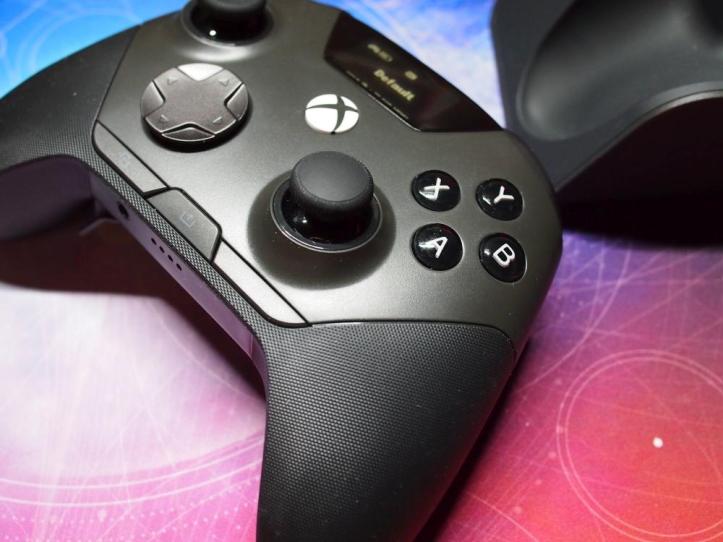
When you pick up the Aeon Pro, the overall shape feels instantly familiar if you have used an Xbox controller, but with a refined, ergonomic twist. SteelSeries gave it a wrap-around textured grip that extends further than usual, covering the sides and back so the controller stays firmly locked in your hands during intense sessions. It balances a comfortable, natural weight with a sturdy build that does not feel overly bulky.
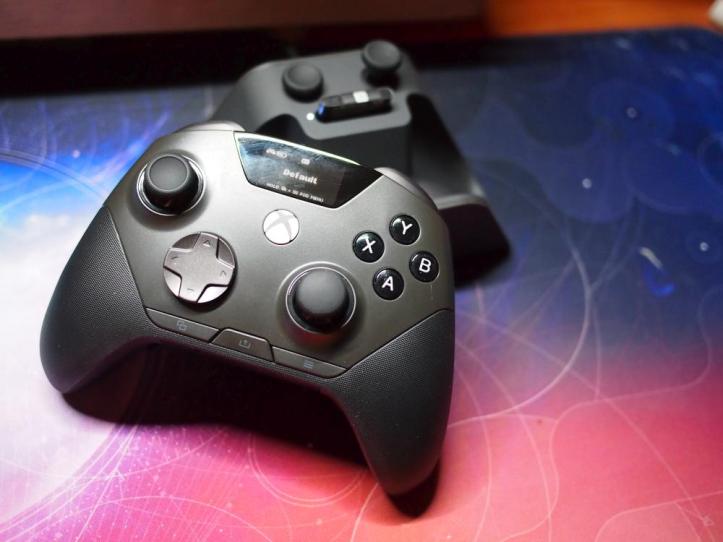
The standout design element sitting right in the center is the OLED smart display. Instead of relying purely on a PC app to tweak your settings, this built-in screen lets you adjust key features on the fly. By holding down the View and Menu buttons, you can navigate menus right on the controller to swap active profiles, check remaining battery, remap buttons, and even adjust thumbstick circularity settings without pausing your game to open software.
As for inputs, SteelSeries leaned into high-performance hardware across the board:
- Circular D-Pad: The directional pad uses a smooth, faceted dish layout that makes diagonal inputs seamless. It feels crisp and tactile, which is great for fighting games, platformers, or quick menu navigation.
- Mechanical Face Buttons: The ABXY face buttons feature snappy mechanical switches instead of standard membrane pads. Every press gives a clean, mouse-like click that registers instantly.
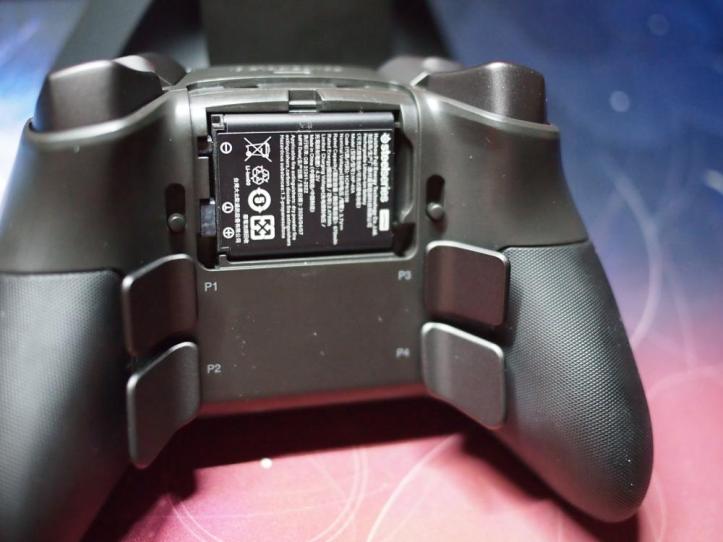
- Rear Paddles: Around back, you get four contoured rear buttons positioned right where your middle and ring fingers naturally rest. They sit flush against the grips to prevent accidental misclicks while remaining easy to trigger.
- Trigger Locks & Thumbsticks: On the top, physical switches let you toggle the Hall Effect triggers from full analog travel to short hair-trigger stops. Up front, the magnetic Hall Effect sticks feature a modular design, allowing you to easily pop off the standard thumbsticks and swap them with different concave or convex options included in the box.
One of the biggest standouts on the Aeon Pro is how SteelSeries handles power. If you are familiar with their high-end headsets, like the Arctis Nova Pro line, you will instantly recognize the approach: the Infinite Power system.
Instead of plugging in a cable mid-game or letting the controller sit on a charging cradle when it dies, the Aeon Pro comes with two removable rechargeable battery packs. One battery sits right inside the compartment on the back of the controller, while the spare charges continuously inside a dedicated slot built into the base station.
When your battery runs low, you pop the back plate off the controller, pull out the depleted pack, and drop it into the dock. Then, you grab the fully charged battery out of the base, slide it into the pad, and snap the cover back on. The entire process takes seconds, and because the batteries are hot-swappable, you don’t lose your connection or have to reboot the controller.
The base station does a lot more than just manage your wireless connection; it serves as a complete desktop dock for your setup.
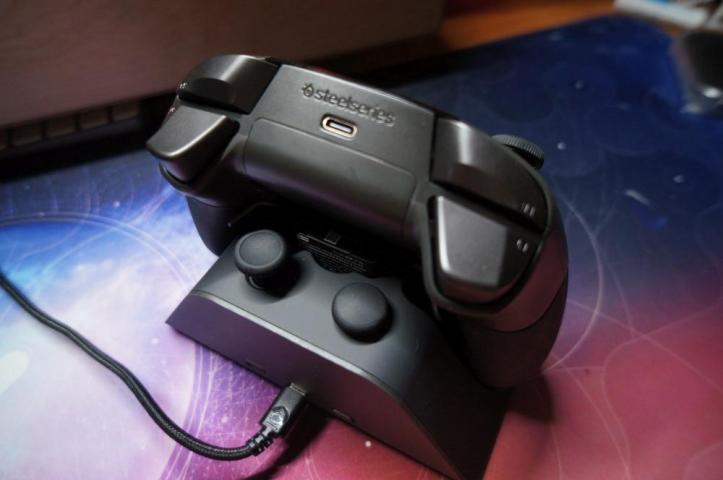
When you are finished gaming, the controller sits directly on top of the base station to charge via magnetic contacts. At the exact same time, a dedicated charging bay on the back of the dock keeps your second hot-swappable battery topped off so you always have fresh power ready to go.
SteelSeries also included two built-in storage slots right on the dock itself to hold your extra modular thumbsticks. It keeps your spare gear organized, easy to reach, and off your desk when you aren’t using them.
EXPERIENCE
Setting up the Aeon Pro is as straightforward as it gets. You just plug the USB-C cable into the base station, and you are pretty much ready to go. Since the dock doubles as the wireless receiver, the controller comes pre-paired out of the box, saving you from messing around with Bluetooth menus or sync buttons. If you already have the SteelSeries GG app installed on your PC, you will likely be prompted for a quick firmware update right off the bat, but the whole process takes just a few minutes.
When it comes to actual gameplay and customization, the user experience is smooth and hassle-free. Programming your inputs is quick whether you decide to use the SteelSeries GG software on PC or handle it directly on the controller using the OLED display. Remapping buttons or setting up custom profiles takes only a few seconds, making on-the-fly tweaks between different game genres super convenient.
The physical swappable parts are just as easy to deal with during long gaming sessions. Swapping out a low battery takes almost no time at all: you snap off the back cover, pop out the drained battery, grab the fresh one sitting in the dock’s charger, and slide it in. The thumbsticks are built on a magnetic system, so swapping between standard, tall, or convex sticks takes zero tools and just a quick pull. It keeps the focus strictly on gaming without making you fight your hardware.
While the overall hardware experience with the Aeon Pro is fantastic, there was one notable bump in the road during testing on PC that is worth keeping in mind.
When first firing up games on Windows, every title tested suffered from severe frame stuttering and micro-freezes whenever the controller was active wirelessly. After a bit of digging, the culprit turned out to be Windows’ background GameInput Services and GameInput Redistributable Services. For whatever reason, these built-in Microsoft services frequently conflict with wireless gamepads, causing background polling loops that tank game performance.
Once those two services were stopped and disabled in the Windows services.msc panel, the stuttering completely disappeared and the Aeon Pro performed flawlessly. It is not an issue unique to SteelSeries, a lot of PC gamers run into this exact conflict with various third-party and wireless controllers on Windows, but it is definitely something to be aware of if you run into unexpected lag or frame drops right out of the box.
FINAL THOUGHTS
The SteelSeries Aeon Pro is an impressive comeback statement. After sitting out of the Windows controller space for over ten years and never officially supporting Xbox until now, SteelSeries did not just ease back in, they delivered a flagship gamepad packed with features that directly address some of the most frustrating pain points of wireless gaming.
The hot-swappable dual battery setup and base station dock alone put it in a league of its own, meaning you never have to plug in a cable mid-session or wait around for a charge. Throw in drift-resistant Hall Effect sticks, crisp mechanical switches, quick OLED menu control, and easy magnetic swapping for parts, and you have a pro-level controller that genuinely feels like a complete ecosystem on your desk.
While the initial Windows GameInput bug was an annoying headache to diagnose, it is a known Windows service quirk rather than a flaw with the hardware itself, and the fix is quick once you know what to look for. Outside of that temporary setup hitch, the Aeon Pro delivers a top-tier gaming experience. If you play on both PC and Xbox and want a high-end, feature-packed controller that will not let you down in the middle of a match, the Aeon Pro is easily one of the most compelling options on the market today.
Thank You for Visiting TheGamerWithKids
I love bringing you guys the latest and greatest reviews whether it be apps or gadgets, but hosting and maintaining a website doesn’t come cheap. If you would like to purchase any of the items mentioned on the site, please do so by clicking our links to Amazon first and then purchasing the items. This way, we get a small portion of the sale and this helps me run the website. Thanks!
This review is made possible with my affiliation with G Style Magazine. These items were sent to us by the company or their PR reps for review and evaluation. It is also featured on the G Style Magazine website which is a tech blog that focuses on the fashion aspect of tech. Please visit their site for more interesting reviews on all your favorite gadgets and gear.

